
Team Liquid has slowly emerged as one of the top contenders in 2022. Here are Yekindar's CS: GO crosshair and other settings. Learn from one of the best.
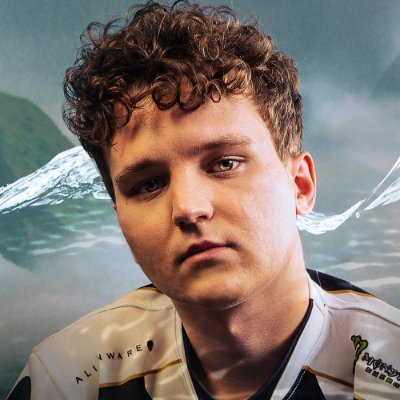
Mareks “YEKINDAR” Galinskis plays for Team Liquid and has helped the North American team make deep runs through several tournaments in 2022. Team Liquid reached the Grand Finals in both ESL Pro League 16 as well as the BLAST Premier World Finals. They lost to Team Vitality at EPL 16 while at the BLAST Premier World Finals, and they fell to G2 esports in the Grand Finals. One of the key players to play for Team Liquid during these tournaments is YEKINDAR. Here are YEKINDAR’s CS: GO crosshair and viewmodel settings.
Mouse
| DPI | 800 | Sensitivity | 1.2 |
| eDPI | 960 | Zoom Sensitivity | 1.00 |
| Hz | 1000 | Windows Sensitivity | 6 |
| Raw Input | 1 | Mouse Acceleration | 0 |
Yekindar’s CS: GO crosshair settings
In CS: GO, the crosshair is the most important setting for any player. The crosshair decides your interaction with every element of the game. However, setting the right crosshair also depends on your personal preference. While pros crosshairs can be useful, we heavily recommend you to try out smaller tweaks and changes to the crosshair to fin dout which one suits you best.
| Drawoutline | 0 | Green | 238 | Size | 2 |
| Alpha | 255 | Red | 0 | Style | 4 |
| Color | 1 | Dot | 0 | Thickness | 0 |
| Blue | 144 | Gap | -3 | Sniper Width | 1 |
Yekindar’s CS: GO Viewmodel settings
The CS: GO ViewModel setting determines the size of the player’s character in the game. Most players decide to change up their viewmodel settings to minimize distractions from the game. Every second counts in CS: GO at the highest level.
| FOV | 60 | Offset X | 1 |
| Presetpos | 1 | Offset Y | 1 |
| Shift Left Amt | 1.5 | Offset Z | -1.5 |
| Shift Right Amt | 0.75 | Recoil | 0 |
Yekindar’s CS: GO bob settings
The bob settings determine the amount of movement of the gun while the player is running across the map. The bob setting does not mean much when there are no enemies in vision, but if there is an enemy that suddenly appears in vision, then it comes down to how much the weapon moved up or down. The vertical movement can be a distraction at the highest level and most players choose to minimize it.
| Lower Amount | 5 |
| Amount Lat | 0.33 |
| Amount vert | 0.14 |
| Cycle | 0.98 |
Yekindar uses a Zowie XL2546K monitor. The 240Hz Monitor is one of the best gaming monitors out there and provides the best output for many players. Yekindar also uses the Zowie EC2-C and the HyperX Alloy FPS RGB keyboard.
Yekindar’s Video Settings
| Resolution | 1920×1080 | Aspect Ratio | 16:9 |
| Scaling Mode | Native | Color Mode | Computer Monitor |
| Brightness | 80% | Display Mode | Fullscreen |
Stay tuned to esports for the latest CS: GO news and updates. You can find other CS: GO crosshair settings here.