


No more third-party apps! Here’s how you can use the new in-game screen recorder in MLBB.
After all these years, Mobile Legends: Bang Bang (MLBB) is finally releasing a built-in screen recorder or clip-sharing feature for your content creation needs. This means you no longer need a third-party app just to record your highlight plays. However, the free video recording feature does have its own limitations. Depending on your preference, this feature may or may not be useful for you.
Here is a quick look at the new in-game screen recorder for MLBB, its features, and a possible release date.
How to access the free clip-sharing feature in MLBB
Recording a clip
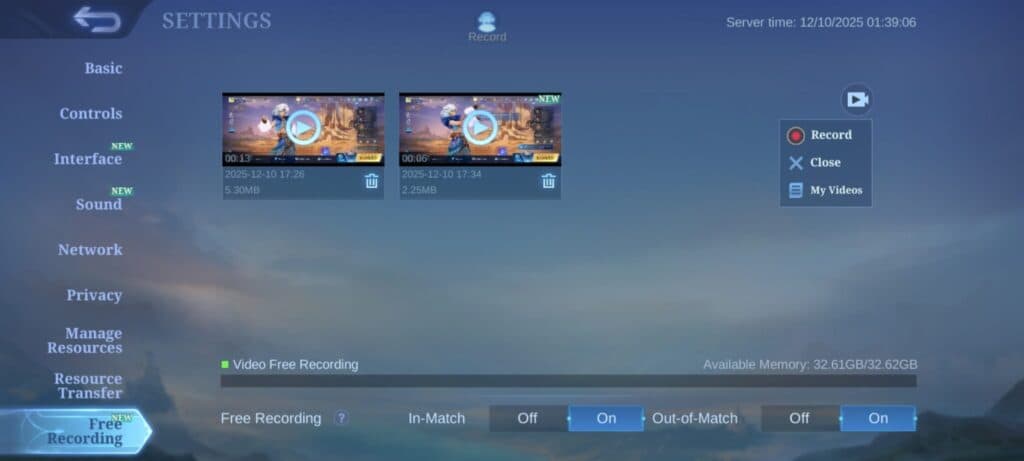
Follow this step-by-step instruction on how to turn on the clip-sharing feature in MLBB:
- Log in to the game.
- Click on the cog icon next to the in-game mail icon at the top right corner of the screen.
- Find the Free Recording tab on the left side options.
- Toggle whether you want In-Match or Out-of-Match recording.
In-Match recording makes it so the recorder will only appear during a match. This means you will not see it while you are in the main menu or in a lobby. The Out-of-Match toggle, on the other hand, enables recording even if you are not in a match. This means you can record what you are doing on the main menu, whether it be pulling for gacha skins or interacting with other players via chat.
Downloading or sharing the clip
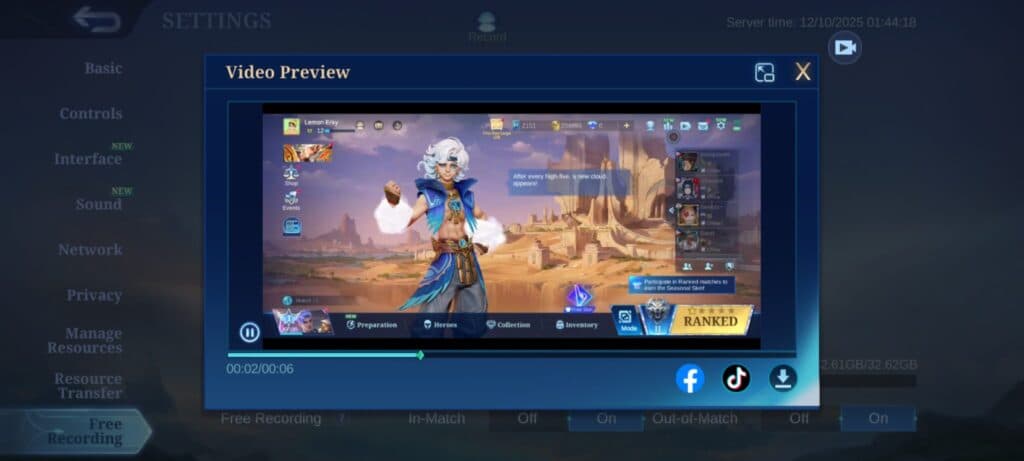
To download the clip or share the clip on social media, here is a step-by-step guide you can follow:
- From the main menu, tap on the cog icon.
- Access the Free Recording tab.
- Select one of the videos you have recorded.
- Choose to share it on social media or download the video.
What is the Video Free Recording feature in MLBB?
The Video Free Recording feature in MLBB is a built-in clip-sharing option that lets you capture your gameplay without the need for third-party apps. For now, it’s very straightforward with a few options to set up. This makes it very accessible to a lot of players who just want to capture their epic moments or catch cheaters red-handed.
The downsides to this feature are that you have no option to set the quality of your recording. This means you are stuck with a 720p video quality. Additionally, the recorder requires permission to access audio. It does not necessarily record your voice. It only captures in-game audio, so you will have to do your separate voice recording. Keep in mind that this is information from the advanced server. The feature may receive changes once it arrives on the original server.
Note: At the time of writing, the in-game screen recorder in MLBB is only available in the advanced server.
MLBB Video Free Recording feature release date
The clip-sharing feature in MLBB is set to release on Dec. 18. The update will arrive alongside the new Ranked Season 38, which is also offering a new set of rewards for competitive players.
Additionally, the new hero Sora will also debut on the same day. This fighter hero can switch between different sets of abilities. This makes him quite versatile, giving more options on which lane you want to use him. However, this also makes him quite complicated to use.
That’s it for our preview of the new in-game screen recorder for MLBB. If you want to stay updated on the latest meta, check out our monthly updated tier list. We analyze the best picks so you are always ready when climbing the competitive ladder.


