


Are you a new player or a veteran wanting to spice up gameplay? Here’s how you can turn on the WASD control scheme in League of Legends
WASD controls are finally hitting live League of Legends servers after months of testing in the PBE! Here is how you can swap to WASD controls in League of Legends right now.
Turn on WASD in LoL
As an important note, the WASD control scheme is only available for non-ranked queues such as ARAM and Swiftplay. There is currently no announced date when WASD will be enabled for both Solo/Duo and Flex queues.
To turn on WASD in League of Legends, you can simply press Esc to open the in-game menu and click Keyboard (WASD) on the Keybinds tab. This will automatically switch other keybinds, so make sure you give them a read before hopping back onto the Rift.
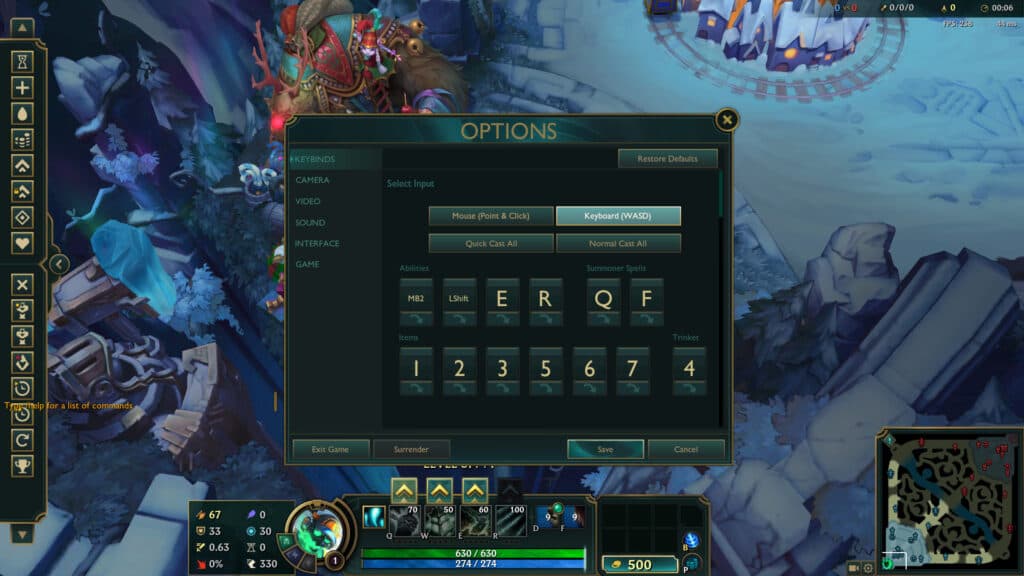
On WASD controls, your abilities will be on MB2 (right click), Left Shift, E, and R. Your Summoner spells will be on Q and F, and the item binds remain the same. While in WASD, you can still choose to have Quick Cast or Normal Cast.
When you scroll down, you'll see a section titled Movement. Here, you see a layout of the movement buttons plus a couple of extra options.
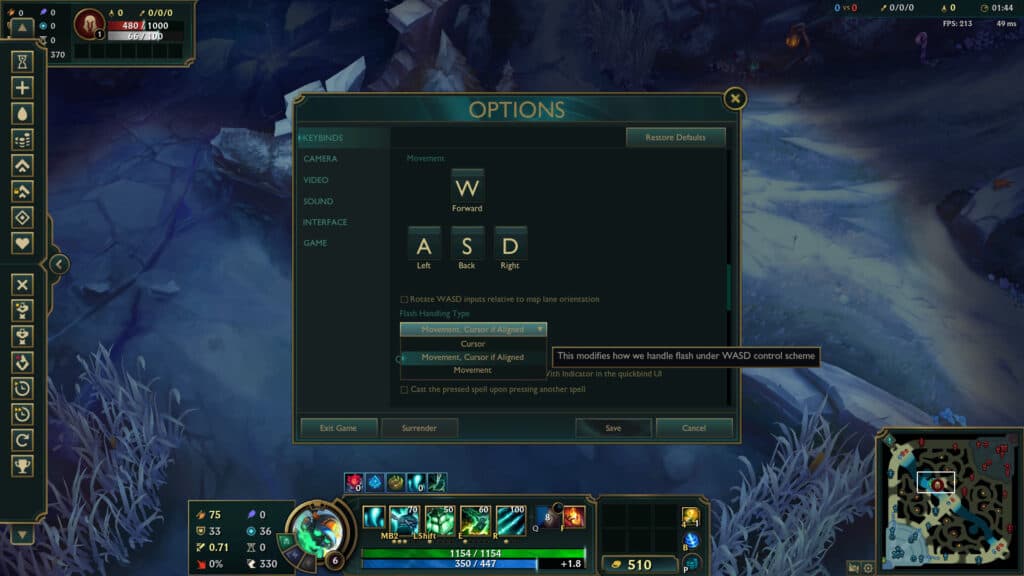
The first is a checkbox labeled Rotate WASD inputs relative to map lane orientation. By default, the WASD direction is absolute: W makes your champion go up, A left, S down, and D right. With this checkbox on, the movement system rotates 45 degrees counterclockwise. W becomes the direction from the Blue Nexus to Red Nexus, S the opposite, and A and D become the same axis as the River.
According to devs, this was suggested by a player online and reduces a lot of hand strain. League of Legends is a game played in an angle, so this may be useful to you.
The second option is Flash Handling Type, with three options. Cursor follows your mouse cursor position when using Flash, while Movement respects your WASD inputs and player rotation. Movement with Cursor seems to be the most comfortable and accurate, but make sure to give all a try to find the right option for you.
How to turn off WASD in League of Legends
To turn off WASD controls, simply press Esc again and click Mouse (Point & Click). All of your previous keybinds should be saved.
For more League of Legends, stick around esports.gg.


