


Steam Families brings Steam Family View and Steam Family Sharing under one umbrella. There's also new features in this announcement.
Valve has introduced Steam Families – a way to share, help streamline purchases and monitor your children’s gaming activities on Steam. The new feature brings some much-needed improvements to how families tend to game and at the same time have some fun. Here’s all you need to know about Steam Families.
What is Steam Families? – Explained
Steam Families is a single location to manage the games that your family can access and when they can play. It brings together some existing features such as Steam Family View and Steam Family Sharing under one umbrella.
With the new Steam Family feature, users can create their own families. The Families feature is ideally to mirror real-life families. So make sure to only add people that are really close to you (a.k.a real family members).
The reason for this is that there is a one-year waiting period from when you leave your family to joining a new one. This is to ensure people don’t treat Steam Families are groups and roam from one family to another. This is quite similar to how you wouldn’t change multiple families in less than a year.
Child Purchase Requests
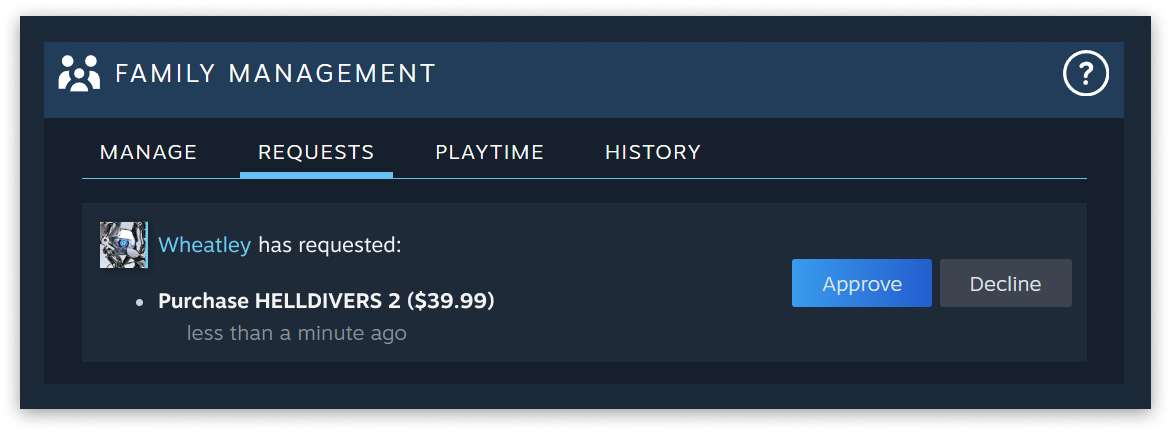
Another crucial feature that is a part of Steam Families is the Child Purcahse Requests. The Child Purchase requests is a feature that will go a long way in enabling better payment rates for video games. It will ensure children have a way to ask their parents to purchase a video game while at the same time ensuring more control for parents of what their children play. For game developers, this might translate into less chargebacks giving them a clearer picture of their revenue sources.
To streamline this process, Steam Families introduces a new payment option where a child account can request an in-family adult to pay for their shopping cart. The adult can approve and pay for the purchase from their mobile device or email. Once approved, all games from the shopping cart will be added to the child’s account.
Valve
Steam Families FAQ: All your Questions Answered
By joining a family, all games are automatically shared with the other members in your family. Adult accounts can use parental controls to limit which games each child in the Family can access.
If a family member gets banned for cheating while playing your copy of a game, you will also be banned in that game.
Yes, adult family members can kick any family member out of the Steam Family.
Steam Families is intended for a household of up to 6 close family members.
Valve may adjust the requirements for participating in a Steam Family or the number of members over time to keep usage in line with this intent.
Let’s say that you are in a family with 4 members and that you own a copy of Portal 2 and a copy of Half-Life. At any time, any one member can play Portal 2 and another can play Half-Life. If two of you would like to play Portal 2 at the same time, someone else in the family will need to purchase a copy of the game. After that purchase, there are two owned copies of Portal 2 across the family and any two members can play at the same time.
In this example, if your family chose to not buy a second copy, you can play any other game in your library while waiting for your family member to finish playing your copy of Portal 2.
A game’s developer controls whether a game is eligible for sharing with Steam Families. All developer settings for the previous Steam Family Sharing feature are being brought forward to Steam Families. So, if a game is currently eligible for Family Sharing, it will remain so in the new system unless the developer chooses to opt-out later.
In addition, not all games can be shared due to technical limitations. For example, titles that require an additional third-party key, account, or subscription in order to play cannot be shared between accounts.
We want as many games as possible to be accessible via Family Sharing, but we realize some games might have special cases where this feature isn’t feasible or doesn’t give users a good experience. Developers who have these concerns can reach out to us via the partner support page to get help with options and solutions.
Stay tuned to esports.gg for the latest Steam news and updates